Project Requirements
- Minimum Unity version:
2022.3.19+
- Required packages:
- Asset store packages:
FMOD plugin for the sounds [optional].
Limitations
Package Installation
Steps
Download & import from the Unity Asset Store .
First time initialization window will appear automatically or you can open it manually from the toolbar
604Spirit/CityEditor/Window/Package Initialization.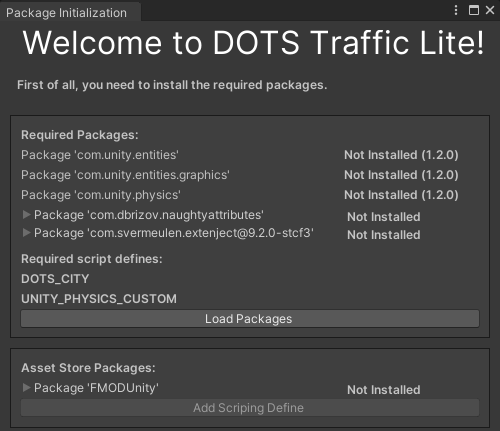
Click Load Packages to start downloading the packages required for this tool.
Note
- Required custom packages:
Naughty Attributes (com.dbrizov.naughtyattributes) - extension for unity inspector made by Denis Rizov, also you can manually download it from unity asset store Naughty Attributes
Extenject (com.svermeulen.extenject) - library for injecting dependencies.
Note
- Script define symbols required for the project:
DOTS_CITY
UNITY_PHYSICS_CUSTOM
Restart the Unity project after all the packages have been downloaded.
Download the required assets from the Asset Store:
Note
- Required asset store packages:
FMOD - asset store plugin for game sounds FMOD
Note
- Script define symbols required for the project:
FMOD
After that, press the Add Scripting Define button.
For more information on how to add sounds click here.
The next step is to set up the new scene or launch the existing Demo scene.